Save toward it
Add a price and a date, put money aside and watch the progress grow.
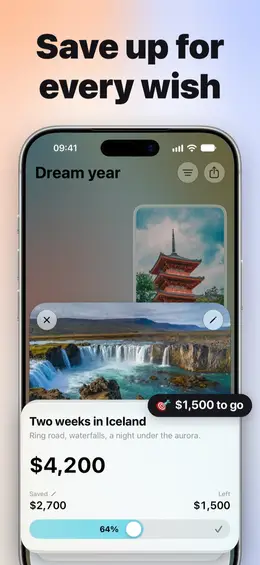
A wish list and a vision board in one. Keep your dreams in sight, and send the list to friends.
Add a price and a date, put money aside and watch the progress grow.
A trip, a watch, a garden of your own — pinned where you see it every day.
Name, photo and price fill in by themselves in most shops.
Invite your partner or family as co-owners through iCloud.
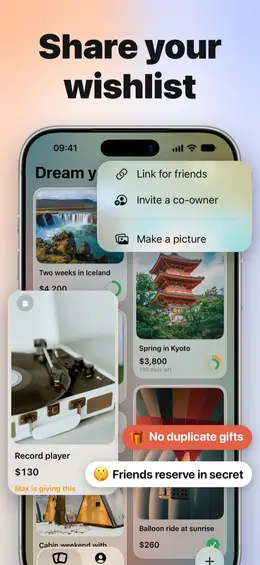
Friends open your list in any browser and tap “I’ll give this”. No app needed.
Wallpapers and prints of your board, plus your own colors, photos and paper tile styles with Premium.
Wishes, photos and prices live on your devices and in your own iCloud. We cannot read them.
A gift link publishes a copy of that one board for friends. Turn the link off and the page and its reservations are deleted.
No sign-up, no advertising, no tracking across apps or websites. Crash reports and usage statistics are anonymous and never contain your wishes.
No. There is no sign-up. Your boards live on your devices and in your own iCloud. Friends who open your gift link need only a browser.
Use the same Apple Account on both and make sure iCloud is on for Wishboard. The first sync on a new device can take a little while.
Free gives you one board of your own with as many wishes as you like, link import, savings, the gift link and co-owners. Boards shared with you don’t count. Premium adds Home Screen widgets, unlimited boards, your own backdrop, tile styles and six app icon colours.
Open a board, tap Share, then Link for friends, and send the link. It opens in any browser, where friends mark what they’ll give so nobody buys the same thing twice.
Not in the app unless you choose to: it shows only how many gifts were picked. In Link for friends, ⋯ › Show me what’s reserved reveals each gift and the name the giver left, and notifies you when someone picks one. The page itself shows guests which gifts are taken.

Wish list & vision board. Free on the App Store.
Download on the App Store (opens in a new tab)