Charts for everything
A mini chart in every row, and a full interactive chart for each currency, stock, ETF and coin.
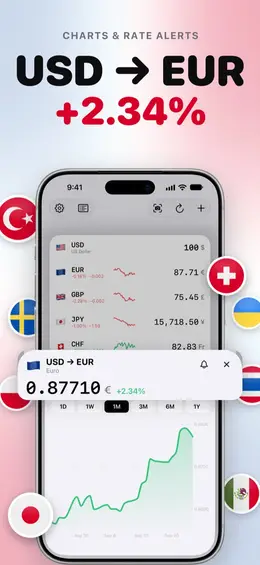
140+ currencies, stocks, crypto and metals in one fast list. Type an amount and every row converts instantly.
A mini chart in every row, and a full interactive chart for each currency, stock, ETF and coin.
Tap any row to type in that currency. Built-in calculator: 100+50 or 200×1.5.
“Tell me when USD/EUR drops below 0.85.” Set a level on any chart and get a notification when it’s reached.
Abroad, Rates offers to add the local currency to your list.
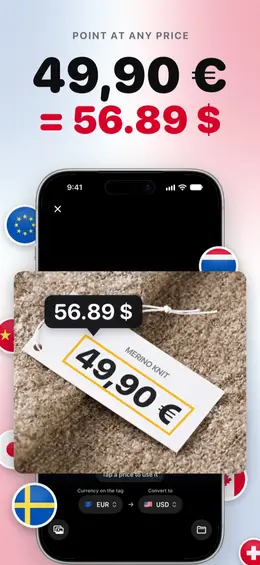
Point the camera at a price tag and see it in your own currency, read right on your device.
Your last rates are always cached — on iPhone, Mac menu bar and Apple Watch.
Rates asks for nothing about you: no sign-up, no e-mail, no password. Crash reports and usage statistics are anonymous.
The price scanner reads tags with Apple's on-device text recognition. The picture is never saved or uploaded.
Yahoo Finance receives the pairs and tickers it prices and what you search for; Financial Modeling Prep, the tickers whose logos you see. Never an amount you type.
No. Rates has no sign-up, no e-mail and no password.
Yes. With iCloud on, your list, base currencies and settings sync to your iPhone, iPad and Mac. Price alerts stay on the device where you made them. Apple Watch gets its list from the paired iPhone.
Free keeps two rows: two currencies, or one currency and one stock, ETF, coin or metal; earlier users keep five. The converter, the price scanner, the 1 Day chart, widgets, the Mac menu bar, Apple Watch and Siri are free. Premium adds an unlimited list, charts from 1 week to 1 year, price alerts and alternate app icons.
Yes. Your last rates are kept, so the list and the converter keep working without a connection. Charts, quote search and alerts need the internet.
Tap the camera in the toolbar, or hold the app icon and choose Scan Price, then point at the tag and tap the price. It is free, on iPhone and iPad, and the picture never leaves your device.

Live exchange rates. Free on the App Store.
Download on the App Store (opens in a new tab)